Biblioteca de cunoștințe
Why Is My VPS So Slow and How to Fix It? Tipărire

What is causing my VPS to run slowly and how can it be resolved?
Is your Virtual Private Server (VPS) slower than molasses? You're in good company. Quite a number of users suffer the gradual yet annoying slowdown with VPS hosting. The performance of your VPS definitely matters whether you are running a web server, managing applications or even hosting gaming sessions. An underperforming server causes a miserable experience for users, and worse yet, missed business opportunities.
The first thing that needs some detailing is the underlying reasons behind your VPS’s performance hitches. Some smart troubleshooting combined with optimization will set you on the path to better performance. Here, we will discuss the most common reasons for sluggish server performance and also some practical tips to remedy the situation.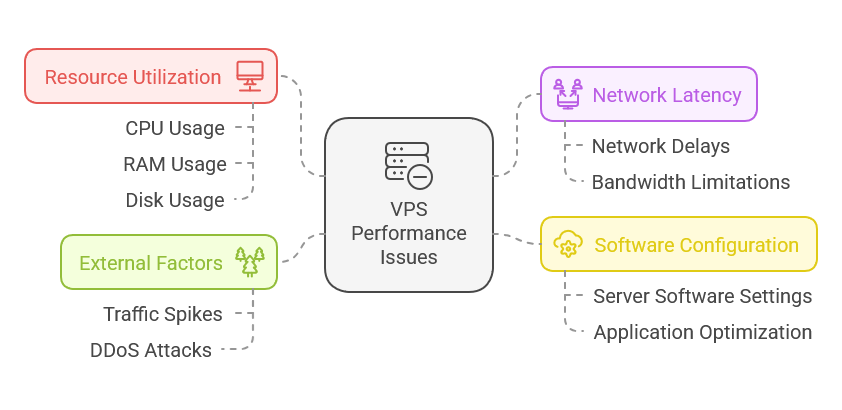
Common Reasons for Slow VPS Performance
A VPS might experience slow performance due to a number of reasons. One particular example is resource over-commitment. A large number of providers use allocated resources which essentially means that you are sharing CPU and RAM resources with a multitude of other users.
At H4F.NET, we strive to offer honest and trustworthy Virtual Private Server (VPS) services. There is no server overselling on our end. Our VPS comes with KVM Virtualization. It provides the ideal environment for servers in regard to performance and stability. Each server comes with powerful AMD Ryzen processors, super speedy NVMe storage, and a premium network providing fast and secure connections. Partner with H4F.NET for hosting your VPS and experience reality with quality which has always been the problem.
An additional common problem is poor server construction. Sluggish response times can be caused by software which is not optimized or simply outdated. Configuration errors in web servers or databases can also add to unnecessary delays.
Another major contributing factor is network issues. If there is a great amount of ping or packet loss, that can severely damage the speed, especially when it comes to international traffic.
In the absence of load balancing, heavy traffic spikes will greatly reduce your VPS capabilities, resulting in considerable delays for users trying to access your site or application.
Lack of Resources: CPU, RAM, and Storage
With a VPS, the resources you have set aside are important and can affect how well the system performs. Without sufficient amounts of CPU, RAM, and storage, things might get a little slower than usual.
Your CPU determines how many processes your server can manage at the same time. Having a low CPU means it will take longer for processes to be completed. This results in slower loading times and unresponsive applications.
How much RAM you have available will determine how well you manage the processes that are currently active.
Not having enough RAM means there will be a lot of back and forth swapping between memory and disk storage which makes things very slow.
Most people forget that storage space is somewhat important as well. When disks are overloaded, reading and writing data to them becomes much slower, which only helps to hinder performance. Managing these resources is their most effective.
With insufficient memory, more sluggishness will occur. While handling requests, data can inefficiently be processed. This lack of effort leads to better performance when RAM is upgraded.
Having a close eye on these resources allow you to see where the bottleneck is early on which gives you the needed time to make adjustments and allow for smooth operations for the VPS.
Limited Resource Allocation
When you opt for a VPS, you’re typically allocated a specific amount of CPU, RAM, and disk space. If you exceed these limits, your server's performance can suffer.
Solution:
- Upgrade Your Plan: Consider scaling up your VPS resources to accommodate your needs better.
Choose a Better Data Center Location
The site of your data center has an important bearing on the performance of your VPS. If your server is located quite some distance from your target audience, it is likely that you will suffer from noticeable latency. This latency affects the time it takes to load web pages and the quality of service provided to the users.
Speed is enhanced when the data center is located closer to the users. Less distance increases the chances of faster response times due to less time taken for the data to be transferred.
Different regions have different standards of the internet. Using a well insulated data center with different options of strong connectivity will increase performance and reliability.
Before choosing a VPS provider, always consider the geographical factors; it might be the biggest factor for your online presence.
Troubleshooting Steps for a Slow VPS
If your VPS has started lagging, it is highly likely that the resources are being overutilized. So the first step is to look at the resource usage. Head to the control panel and check the CPU, RAM, and disk I/O. If any of these resources are being over-utilized, it is possible you need additional resources or there is an application that is behaving poorly.
Moving on, take a look at the processes that are running. Some processes or applications might be using an unreasonable amount of memory or processing power. On Linux servers, you can use `top` or `htop` commands to see the details of system resources and figure out which processes are the resource guzzlers.
Performance can also be throttled due to other network related issues. To rule out network connectivity problems, a simple diagnosis can be done by performing a speed test from the server using `ping` or `tracert`. These two tools can help determine the network connectivity issues, if any, that are affecting response times.
Make sure the applications and the operating system is upgraded as well. If not, it can contribute towards security weaknesses as well as slower speeds which should be avoided.
Sometimes reviewing the logs for errors or warnings provides hidden insights into the underlying issues that impacts performance.
When to Consider Upgrading Your VPS Plan
When a website or application is running slow even after the settings are optimized, that could be a clear reason for an upgrade. It could be just optimized, but not necessarily upgraded.
Always watch out for slow loading times and increased downtime – these are good indicators that your existing resources are failing to meet the requirements.
Being hit with sudden spikes in traffic is also a clear indicator. If there is an increase in visitors alongside the lag, you should consider looking into your VPS.
Moreover, if you are running server heavy applications or multiple websites on a single server, chances are you are overloading which could warrant an upgrade.
Monitoring tools will always be helpful to provide insightful data about how much CPU and RAM is being utilized. If there is consistently high usage across the board, it is safe to claim the existing setup is a bit outdated.
Always pay attention to what customers are saying - slow load times will greatly affect the user experience as well as retention rates.
Software Conflicts or Limitations
Multiple software applications may conflict with one another, causing performance bottlenecks.
Solution:
- Regular Maintenance: Perform software updates and clean installations periodically to eliminate conflicts.
- Disable Unused Services: Turn off services and applications that you aren't currently using to free up server resources.
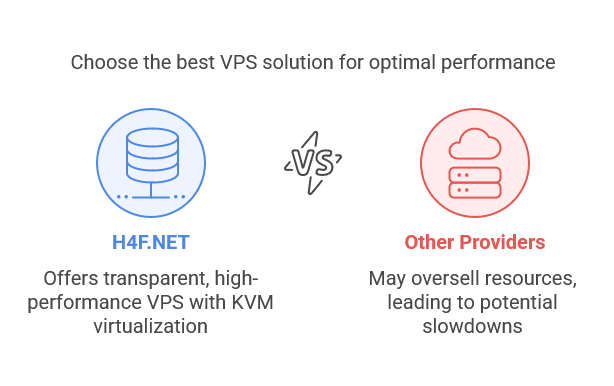
Elevate Your Performance with H4F.NET
If you're looking for a solution to your VPS performance issues, consider H4F.NET. We offer Best VPS options across Europe, the USA, and Asia, enabling you to choose a plan that fits your specific needs. Enjoy scalable resources, reliable speeds, and outstanding customer support with H4F.NET — ideal for gamers, developers, and businesses alike. With our advanced infrastructure, you can significantly reduce latency and improve the user experience.
Conclusion
Dealing with poor performance on your VPS server is never an easy task. Gaining insight into the most probable causes of the issue and knowing how to fix them effectively matters a lot. Selecting a proper data center location, optimizing resources, and implementing the right strategies can tremendously improve the performance of your VPS service.
Remember that if you are considering changing providers or upgrading your plan, not every VPS host is of equal quality. Take a pick that suits you best regarding speed and reliability. Knowing this, you can deal with the sluggish performance, and make sure that the online services you provide run well. It is definitely possible to attain the performance you wish your VPS had with the best approach.
Răspunsul a fost util?
Articole similare
Hi Thank you for choosing service from Host4Fun . Go to run > cmd > slmgr.vbs /rearm and...
By default Windows Server 2008 firewall blocks ping requests. To enable please follow the...
By default Windows Server 2012 firewall blocks ping requests. To enable please follow the below...
Hi , Thank you for choosing Service from Host4Fun.Com. When we run command "yum update" on our...
For Guide Visit :...
