Wissensdatenbank
How to Secure Your cPanel Account? Artikel drucken
How to Secure Your cPanel Account?
Your cPanel account is like the control center for your website. It manages everything from email accounts to databases, making it a crucial tool for any site owner. But with great power comes great responsibility—especially when it comes to security. Cyber threats are constantly evolving, and hackers are always on the lookout for vulnerabilities to exploit.
If you want to keep your online presence safe and sound, securing your cPanel account should be at the top of your priority list. In this blog post, we'll explore common security threats that can compromise your account and provide practical tips to boost its defenses. Whether you're new to cPanel or a seasoned user, ensuring robust protection will give you peace of mind while navigating the digital landscape. Let's dive in!
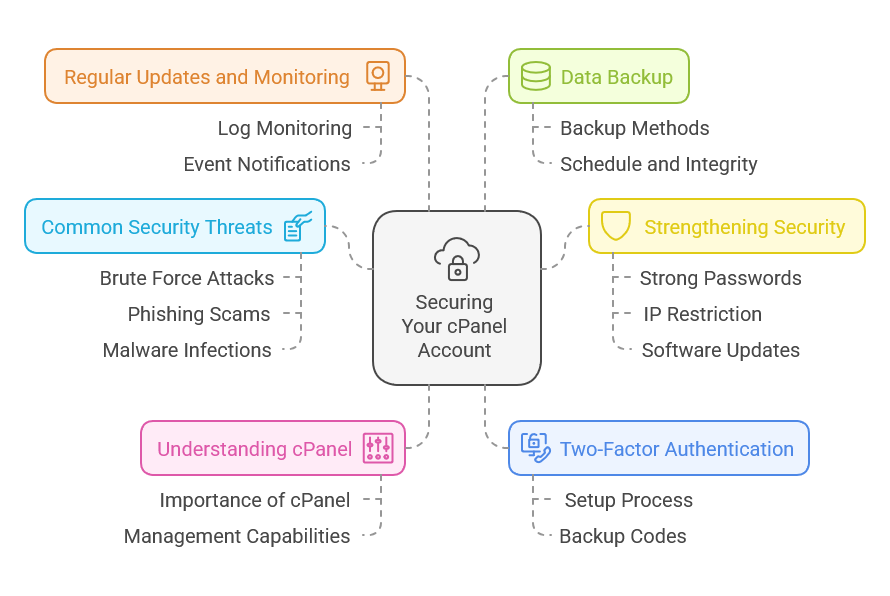
Understanding cPanel and its Importance
cPanel is a web hosting control panel that simplifies the management of servers and websites. This user-friendly interface allows users to handle various aspects of their online presence without needing extensive technical knowledge.
With cPanel, you can easily manage files, databases, emails, and domains all in one place. It streamlines complex tasks like installing software or setting up email accounts into straightforward clicks.
The importance of cPanel lies in its ability to empower website owners. Whether you're launching a personal blog or running an e-commerce site, having control over your server environment enhances efficiency and productivity.
Moreover, it provides essential tools for monitoring resource usage and managing security settings. As your website grows, understanding how to navigate cPanel effectively becomes vital for maintaining optimal performance and ensuring everything runs smoothly behind the scenes.
Common Security Threats to cPanel Accounts
cPanel accounts are popular targets for cybercriminals due to their wide usage in web hosting. One common threat is brute force attacks, where hackers use automated tools to guess passwords. A weak password makes this process alarmingly easy.
Another concern is phishing scams. Users may receive deceptive emails that mimic legitimate cPanel communications, tricking them into revealing login credentials or installing malware. Staying alert can help you avoid these traps.
Malware infections also pose a significant risk. If your website gets compromised, it could lead to data breaches or unauthorized access to sensitive information stored in your account.
Additionally, outdated software versions can leave vulnerabilities open for exploitation. Regular updates are crucial for maintaining the integrity of your cPanel environment and ensuring robust security measures are in place against evolving threats.
Tips for Strengthening Your cPanel Account's Security
Strengthening your cPanel account's security is crucial. Start by using a strong, unique password. Combine uppercase and lowercase letters, numbers, and symbols to create complexity.
Next, restrict access by limiting IP addresses that can connect to your cPanel. This adds an extra layer of protection against unauthorized users.
Keep software updated. Regularly check for updates on both cPanel and any applications you have installed. Outdated software can be a doorway for attackers.
Consider changing the default port used to access cPanel from 2083 or 2087 to something less common. This simple tweak makes it harder for bots to locate your login page.
Monitor logs frequently. Check for unusual activity or failed login attempts to catch potential threats early on before they escalate into serious issues.
Setting Up Two-Factor Authentication
Two-factor authentication (2FA) adds an essential layer of protection to your cPanel account. It requires not just a username and password but also a second piece of information before you gain access.
Setting it up is straightforward. Most cPanel environments offer 2FA options, which often include using an authentication app like Google Authenticator or Authy. Once installed on your smartphone, these apps generate time-sensitive codes that enhance security.
After enabling 2FA in your cPanel settings, you'll be prompted for this additional code whenever you log in. This means even if someone discovers your password, they won't get far without the verification code.
Remember to keep backup codes handy in case you lose access to your mobile device. It's a small step that dramatically increases the safety of your online presence and gives peace of mind knowing you're well-protected from unauthorized access.
Regularly Updating and Monitoring Your cPanel Account
Regular updates are crucial for maintaining the security of your cPanel account. Software vulnerabilities can be exploited by cybercriminals, leading to unauthorized access or data breaches. Regularly check for updates and apply them promptly.
Monitoring your account is equally important. Keep an eye on logs and user activity to spot any unusual behavior. If you notice unfamiliar logins or changes made without your knowledge, act swiftly to secure your account.
Consider enabling notifications for critical events such as failed login attempts or password changes. This added layer of awareness can help you respond quickly if something seems off.
Establish a routine schedule for both updating software and reviewing account activity. A proactive approach will not only enhance security but also give you peace of mind knowing that you're in control of your digital environment.
Backing Up Your Data
Backing up your data is a non-negotiable step in maintaining a secure cPanel account. It ensures that you have copies of your files and databases, ready to recover if something goes wrong.
There are various methods to back up your data. You can use the built-in backup feature within cPanel or utilize external solutions like cloud storage services. Each method has its benefits, depending on your needs.
Regular backups should be scheduled. This way, you’re not scrambling when an unexpected issue arises. Consider daily or weekly schedules based on how often you update content.
Don't forget to check the integrity of your backups too. A corrupted backup is as good as no backup at all! Ensure that you're storing these backups securely, away from potential threats lurking in your main server environment.
Frequently Asked Questions (FAQs)
1. How do I enable Two-Factor Authentication in cPanel?
- To enable 2FA in cPanel, log in to your account, go to the "Security" section, and look for "Two-Factor Authentication." Follow the prompts to set it up using an authentication app on your mobile device.
2. What should I do if I suspect my cPanel account has been compromised?
- Immediately change your password and enable 2FA. Review your account activity logs for any suspicious actions, restore from your last backup if necessary, and contact your hosting provider for assistance.
3. Are there security tools available to help protect my cPanel account?
- Yes, many security tools are available, such as firewall settings within cPanel, antivirus scanners, and website monitoring services. Consider using a comprehensive security plugin if you are running a CMS like WordPress.
4. Can I limit the number of login attempts for my cPanel account?
- Yes, cPanel allows you to configure settings to limit login attempts. This feature helps mitigate brute-force attacks by temporarily blocking IP addresses after a specified number of failed login attempts.
5. Is cPanel secure by default?
- While cPanel has built-in security features, it is essential to take additional steps to secure your account. Users need to implement best practices and regularly review their security settings to maintain a secure environment.
Importance of Securing Your cPanel Account for Smooth Performance and Peace of Mind
Securing your cPanel account is not just a matter of protecting files and websites; it’s about ensuring smooth performance and peace of mind. Every day, cyber threats are becoming more sophisticated, which means that taking proactive steps to safeguard your account is essential.
By understanding the risks and implementing strong security measures like two-factor authentication, regular updates, and consistent monitoring, you create a solid defense against potential breaches. Additionally, routine data backups will save you from unexpected losses caused by attacks or malfunctions.
A well-secured cPanel account enhances not only the safety of your online presence but also builds trust with clients and users who rely on your services. Prioritizing these security practices allows you to focus on what truly matters—growing your business without worrying about vulnerabilities lurking in the shadows.
War diese Antwort hilfreich?
Hi Thank you for choosing service from Host4Fun . Go to run > cmd > slmgr.vbs /rearm and...
By default Windows Server 2008 firewall blocks ping requests. To enable please follow the...
By default Windows Server 2012 firewall blocks ping requests. To enable please follow the below...
Hi , Thank you for choosing Service from Host4Fun.Com. When we run command "yum update" on our...
For Guide Visit :...
