مرکز آموزش
Running Forex Trading Software on VPS پرینت این مقاله
Running Forex Trading Software on a 2GB RAM or 4GB or 8GB VPS?
Forex trading has become a popular avenue for individuals seeking financial independence and flexibility. With the right tools at your disposal, traders can navigate this fast-paced market with confidence. One of those essential tools is Forex trading software, designed to analyze trends, manage trades, and automate processes. But what happens when you're ready to dive into the world of Forex but are limited by your hardware?
This is where Virtual Private Servers (VPS) come into play. A VPS allows you to run your trading software efficiently without being tied down by local resources. However, not all VPS setups are created equal—especially when it comes to RAM capacity. Whether you have 2GB, 4GB, or even 8GB RAM available can significantly impact your trading experience.
So let's break down the specifics: Can a modest 2GB RAM VPS handle your Forex trading needs? What about its bigger siblings? Join us as we explore these questions and find out how to optimize your setup for success in the dynamic world of Forex trading!
Minimum Requirements for Running Forex Trading Software on VPS
Running Forex trading software on a VPS requires specific minimum system requirements to ensure smooth and efficient performance.
Typically, the operating system should be Windows or Linux, as most trading platforms are optimized for these environments. A solid internet connection is crucial since latency can affect your trades.
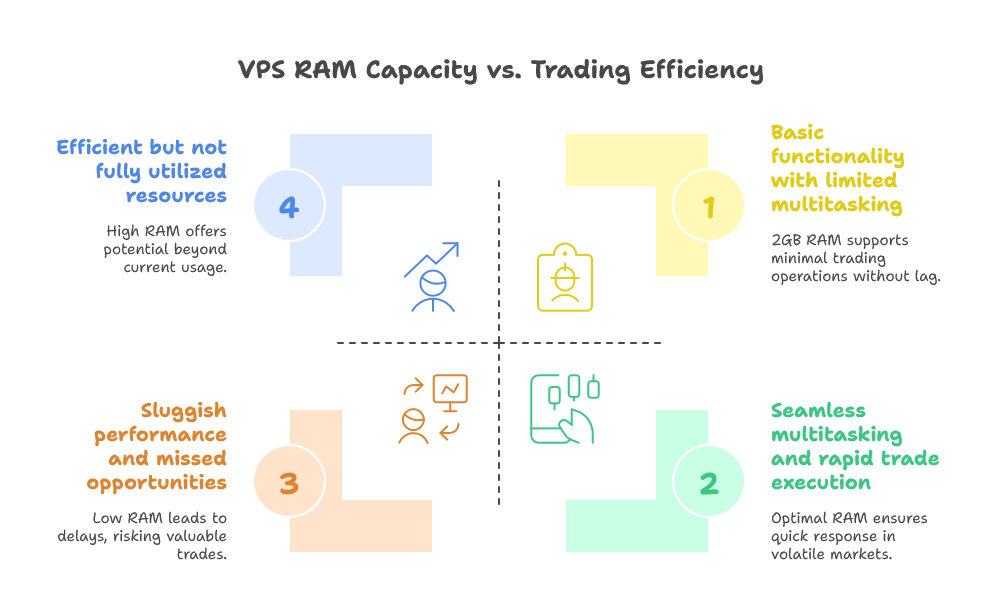
Memory plays a vital role in how well the software operates. While some programs may run with less, 2GB of RAM is often considered the bare minimum for basic functionalities without significant lag.
RAM, or Random Access Memory, plays a crucial role in Forex trading. It directly impacts how smoothly your trading platform operates. The more RAM you have, the better your system can handle multiple processes simultaneously.
When running MT4 or other trading terminals, sufficient RAM allows for quick data processing and trade execution. This speed is essential in the fast-paced world of Forex where every second counts. Low RAM can lead to lagging performance, potentially costing you valuable opportunities.
Additionally, sufficient disk space is necessary to store logs and data files generated by your trading activities. At least 20GB of storage is recommended to accommodate updates and other essential resources.
The processor speed also matters; CPUs with at least dual-core capabilities provide better multitasking abilities during peak trading hours.

Potential Limitations of Using a 2GB RAM VPS
Using a 2GB RAM VPS for Forex trading can come with some drawbacks. One major concern is limited multitasking capabilities. If you're running multiple applications or charts simultaneously, you may experience sluggish performance.
Additionally, resource-intensive trading strategies might not function optimally on such low memory. This could lead to delays in executing trades, which is critical in the fast-paced forex market.
Another limitation involves storage space and processing power. A 2GB RAM setup might struggle under heavy data loads during peak market hours.
Moreover, it may not support advanced trading tools that require higher specifications. As a result, traders could miss out on valuable features that enhance their decision-making processes.
As your trading strategy evolves or if you scale operations, upgrading becomes essential due to these constraints.
What About a 4GB RAM VPS?
A 4GB RAM VPS offers a noticeable upgrade in performance compared to its 2GB counterpart. With this increased memory, you can run multiple instances of Forex trading software simultaneously without experiencing significant slowdowns.
This is particularly beneficial for traders who utilize various strategies or need to monitor multiple currency pairs at once. The additional RAM allows smoother execution of trades and quicker response times during market fluctuations.
Moreover, the extra capacity supports more extensive data analysis tools and indicators, enhancing your overall trading experience. You’ll find that backtesting strategies also runs more efficiently with 4GB of RAM.
However, it’s essential to choose a reliable VPS provider that guarantees uptime and speed. A well-optimized environment ensures that your trading activities remain uninterrupted during critical market hours.
The Advantages of Using an 8GB RAM VPS for Forex Trading
An 8GB RAM VPS offers exceptional performance for Forex trading. It allows for seamless multitasking, enabling traders to run multiple applications and strategies without lag.
With adequate memory, you can host various trading platforms simultaneously. This flexibility is crucial during volatile market conditions where timing is everything.
Enhanced speed means quicker execution of trades. In Forex trading, even a fraction of a second can impact your profits significantly.
Additionally, an 8GB VPS provides ample space for advanced analysis tools and bots. Traders can implement complex algorithms that require more computational power.
Security also benefits from higher RAM capacity; it supports running robust antivirus software and firewalls to protect sensitive data.
Stability becomes less of a concern with such resources at your disposal. Less downtime translates into more opportunities in the fast-paced world of Forex trading.
آیا این پاسخ به شما کمک کرد؟
مقالات مربوطه
Hi Thank you for choosing service from Host4Fun . Go to run > cmd > slmgr.vbs /rearm and...
By default Windows Server 2008 firewall blocks ping requests. To enable please follow the...
By default Windows Server 2012 firewall blocks ping requests. To enable please follow the below...
Hi , Thank you for choosing Service from Host4Fun.Com. When we run command "yum update" on our...
For Guide Visit :...
