Hjälpcentral
Windows VPS Going Offline Automatically? Skriv ut denna artikeln
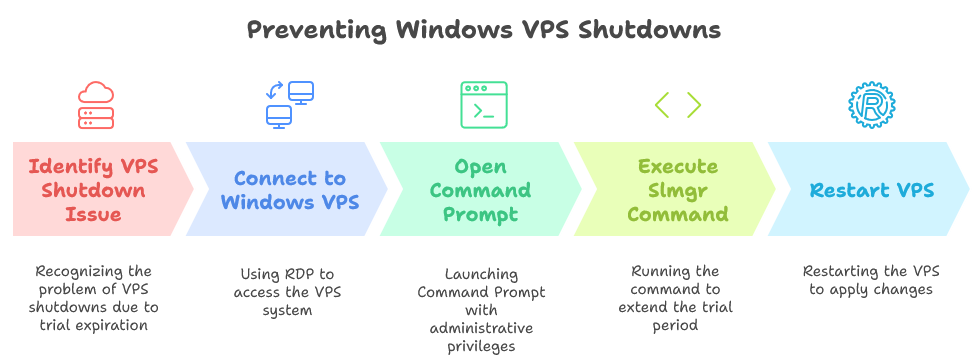
How to Preventing Windows VPS Automatic Shutdowns Due to Expired Trial Licenses
Renew Your Windows VPS License and Keep Your Services Running
If you've recently encountered the frustrating experience of your Windows VPS going offline automatically, you’re not alone. This often occurs due to the trial license expiring, leaving your server unusable and your projects in jeopardy. Fortunately, there’s a simple solution to extend your Windows Server OS license using the command slmgr.vbs /rearm. In this in-depth guide, we’ll explore why this happens, how to use the rearm command, common causes for expired licenses, and provide answers to frequently asked questions.
Understanding the Windows VPS Trial License
Windows Virtual Private Servers (VPS) often come with a trial license for testing purposes. This license typically has a duration of 180 days. Once the trial period expires, features become limited, and the system may go offline until a valid license is purchased.
Why Your Windows VPS Goes Offline
When the trial period of your Windows Server operating system expires, you might experience several issues, including:
- Automatic shutdowns or reboots
- Restricted access to system features
- Notifications prompting you to activate your Windows
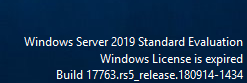
To prevent your Windows VPS from going offline immediately after the trial expires, you can use the command-line tool slmgr.vbs. This method allows you to extend your Windows Server OS license for an additional 180 days. Below are the steps to do this:
Step-by-Step Instructions
-
Connect to Your Windows VPS
- Use Remote Desktop Protocol (RDP) to connect to your Windows VPS.
-
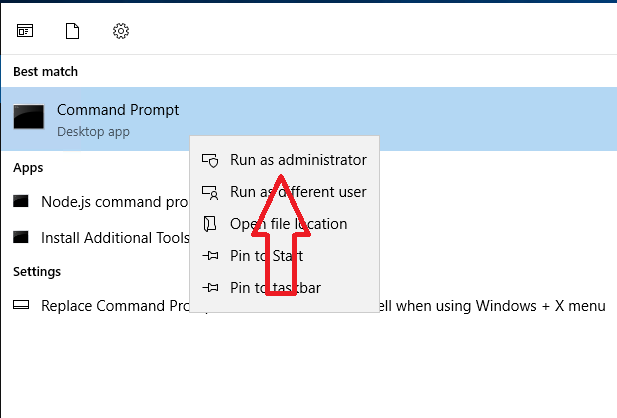
Open Command Prompt as Administrator
- Press
Windows + Rto open the Run dialog. - Type
cmdand pressCtrl + Shift + Enterto run as an administrator.
- Press
-
Execute the Slmgr Command
- In the Command Prompt window, type the following command:
slmgr.vbs /rearm
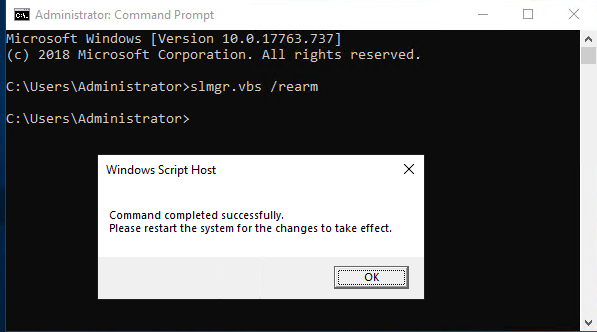
Restart Your VPS
Following these steps will help you extend your Windows VPS license for another 180 days.
Frequently Asked Questions (FAQs)
1. What happens if I run slmgr.vbs /rearm after my trial has already expired?
If the trial has expired, you may still be able to use the /rearm command. However, keep in mind that this can only be done a limited number of times (usually three), depending on your Windows Server version.
2. How do I check how many rearm attempts I have used?
You can’t directly check the number of remaining rearms; however, you can attempt to execute the command. If you’ve reached the limit, it will inform you.
3. Will using the /rearm command delete my files or settings?
No, using the /rearm command will not delete your files or settings. It only resets the activation timer.
4. What is the difference between a trial license and a full license?
A trial license is time-limited and primarily intended for evaluation purposes, while a full license provides an indefinite period of operation and includes additional support and features.
5. Can I continue to use my VPS without activating Windows?
Technically, you can use a VPS without Windows activation, but you will face limitations, and the system may shut down unexpectedly or operate in a reduced functionality mode.
Experiencing automatic shutdowns on your Windows VPS due to an expired trial license can be a common and frustrating issue. By following the simple method outlined in this guide, utilizing slmgr.vbs /rearm, and understanding the implications of license management, you can prevent interruptions to your service. For a seamless experience, it's always best to acquire a full license as soon as possible, ensuring your Windows Server remains operational without unexpected closures. Don’t forget to monitor your license status regularly to avoid any future complications!
You can also open support ticket with us and we can assist you further.
Hjälpte svaret dig?
Relaterade artiklar
If your VPS utlilizes of all its bandwidth allocated for the month, it will be automatically...
You will have full root access for your linux virtual machine .If you are getting windows vps ,...
Hi If you are wondering if it is possible to get cPanel license from Host4Fun directly , then yes...
Hi Your VPS was most probably causing high load (over x 4 each !) on the main server . So...
We recommend you to use DNS provided by your domain registrar or use cloudflare . You will need...
