Base de conocimientos
How to request service cancellation. Imprimir este artículo
Hi
We acknowledge that there may be times when you would like to stop using a VPS and cancel it.
Fortunately, this procedure is as easy as it gets.
You can always cancel your VPS by simply following the instructions below.
First you would need to navigate to Home and Navigate to My Products & Services.
https://client.host4fun.com/clientarea.php

After that navigate to My Products & Services
https://client.host4fun.com/clientarea.php?action=products
Afterwards click on "Manage" button to view your product details .
Navigate to right-side and you will see option > Overview > Request Cancellation . 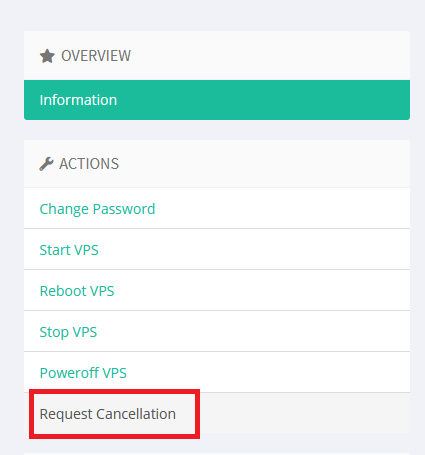
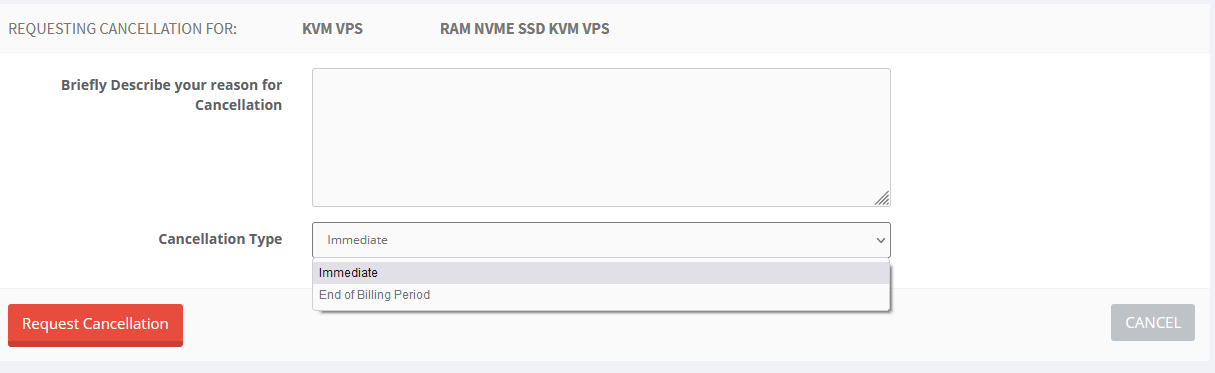
After you describe your reason for cancellation , you need to select type of cancellation either Immediate or End of Billing Period and hit Request Cancellation button .
Please note, cancellation a service does not mean refund. Open a ticket for refund.
Thanks
¿Le ha resultado útil esta respuesta?
Artículos relacionados
If your VPS utlilizes of all its bandwidth allocated for the month, it will be automatically...
You will have full root access for your linux virtual machine .If you are getting windows vps ,...
Hi If you are wondering if it is possible to get cPanel license from Host4Fun directly , then yes...
Hi Your VPS was most probably causing high load (over x 4 each !) on the main server . So...
We recommend you to use DNS provided by your domain registrar or use cloudflare . You will need...
