Base de Conhecimento
Add Funds/Account Credit Information. Imprima este artigo
Why Add Funds ?
Add funds to your account with us to avoid lots of small transactions and to automatically take care of any new invoices that are generated.
Visit : https://client.host4fun.com/clientarea.php?action=addfunds
Where can I check Credit/Fund amount available with my account?
First login to your H4F account and navigate to top-right corner and click on the circular exclamation mark button and after wards you will be able to see the funds/credit available with your account.
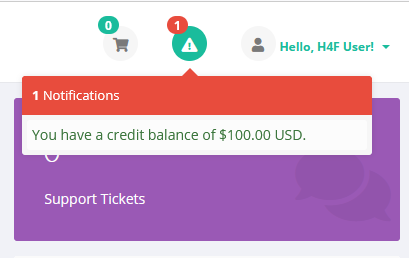
Over payments are automatically added to your "H4F" account as credit/funds, which you can use any time to place new order or renew current services.
Note : Account Funds/Credit are non-refundable.
Thanks
Esta resposta foi útil?
Artigos Relacionados
What happens if I run out of bandwidth?
If your VPS utlilizes of all its bandwidth allocated for the month, it will be automatically...
If your VPS utlilizes of all its bandwidth allocated for the month, it will be automatically...
Will I have full root / administrator access to my VPS?
You will have full root access for your linux virtual machine .If you are getting windows vps ,...
You will have full root access for your linux virtual machine .If you are getting windows vps ,...
cPanel License with Host4Fun VPS
Hi If you are wondering if it is possible to get cPanel license from Host4Fun directly , then yes...
Hi If you are wondering if it is possible to get cPanel license from Host4Fun directly , then yes...
Why My OpenVZ VPS Suspended?
Hi Your VPS was most probably causing high load (over x 4 each !) on the main server . So...
Hi Your VPS was most probably causing high load (over x 4 each !) on the main server . So...
How to point your VPS IP to a Domain/DNS
We recommend you to use DNS provided by your domain registrar or use cloudflare . You will need...
We recommend you to use DNS provided by your domain registrar or use cloudflare . You will need...
